
Partial Color Master - Editor MOD APK v1.18.0 (VIP Unlocked) - 5PLAY

- Updated
- Version 1.18.0
- Requirements Android 7.0
- Developer Powder Code
- Genre Photography
- Google Play

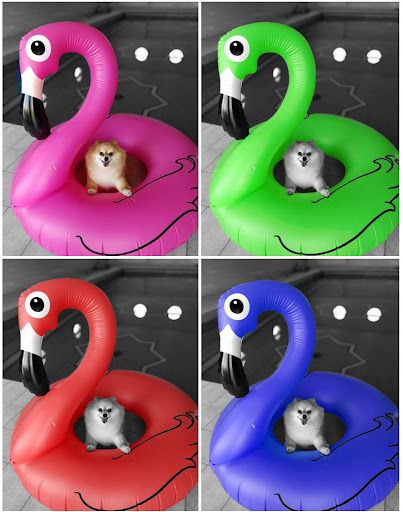
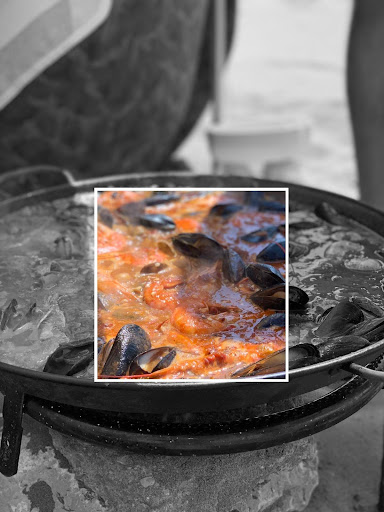



Partial Color Master Mod APK is a photo edit tool focused on color slpash, color pop, selective color or partial color effect.
Introduction to Partial Color Master
Partial Color Master is an innovative photo editing tool designed for those who wish to add a dramatic flair to their images through techniques like color splash, color pop, selective color, or partial color effects. This tool not only enhances your photos but also allows for creative expression through color manipulation.
Advanced Color Manipulation Features
Color Swap Feature
One of the standout features of Partial Color Master is the Color Swap functionality. This tool enables users to alter the colors within an image, replacing them with entirely new hues. This feature is perfect for those looking to give their photos a surreal or thematic twist, transforming ordinary scenes into extraordinary visual stories.
Color Frame Feature
Another unique addition to the toolset is the Color Frame feature. Unlike traditional editing where the entire image might be converted to black and white, this feature allows users to select a specific section of the photo to remain in color while the rest turns monochrome. Users can choose from a variety of frames to apply this effect, offering a blend of creativity and control over the aesthetic outcome.
The Partial Color Technique
Partial color editing involves converting a photograph to black and white and then selectively reintroducing color to specific areas. This technique not only draws attention to particular elements within the image but also creates a striking visual contrast. Partial Color Master simplifies this process with its intuitive interface, allowing users to either capture new photos or select existing ones from their gallery.
Unique Color Intensity Selector
A notable aspect of this tool is the color intensity selector, which streamlines the editing process. This feature allows users to adjust how vibrant or subdued the colors appear, providing a nuanced control over the final look of the image.
Step-by-Step Editing Process
The editing process in Partial Color Master is structured into three straightforward steps, ensuring users of all skill levels can achieve professional-looking results.
Whats Mod of Partial Color Master - Editor
VIP UnlockedWhats News of Partial Color Master - Editor
- Compatibility for bigger photos- Bug fixes- Modern devices compatibilityStep 1: Color Splash
- Color Selection: In this initial phase, users can directly select the colors from the image they wish to highlight. This step is crucial as it sets the foundation for the partial color effect, determining which parts of the image will remain colorful against a monochromatic background.
Step 2: Manual Edit
- Precision Editing: After selecting the colors, the manual edit phase allows for detailed adjustments. Users can use a brush tool to refine the areas where color is applied or removed, ensuring precision in the color splash effect. This step is where creativity meets control, enabling users to perfect their vision.
Step 3: Publish
- Finalizing and Sharing: The final step involves saving the edited photo to the device. Once saved, users can easily share their creations on various social media platforms, showcasing their artistic flair to a broader audience.
Conclusion
Partial Color Master stands out as a versatile tool for photo editing enthusiasts who wish to explore beyond the conventional. Its features like color swap and color frame, combined with the ease of applying partial color effects, make it an invaluable asset for creative expression. Whether for personal projects or professional portfolios, this tool empowers users to transform ordinary photos into visually compelling artworks with just a few steps. With its user-friendly interface and powerful editing capabilities, Partial Color Master is set to become a favorite among photographers and digital artists alike.
Comprehensive Hub for Premium Mod APKs & Unlocked Android Software – 5playru.com
In the contemporary mobile ecosystem, microtransactions, aggressive paywalls, and intrusive advertising frequently disrupt the user experience. 5playru.com serves as a premier, independent repository engineered to bypass these digital restrictions. We provide power users and mobile gamers with rigorously tested, high-fidelity Mod APKs, premium application packages, and cracked Android software that restore full control over your device's capabilities without financial commitments.
Our infrastructure caters to global Android enthusiasts demanding optimal performance. Whether you are seeking fully unlocked premium editing suites, ad-free streaming clients, or mobile games injected with unlimited resources (currency, premium skins, progression bypasses), 5playru.com delivers optimized binaries configured for stability, security, and hardware compatibility.
Understanding Mod APK Architecture: Engineering the Unlocked Experience
A modified Android Package (Mod APK) is not merely a cracked file; it is the result of precise reverse-engineering. Specialized developers decompile the original .apk or .xapk source code, modify the Dalvik Executable (.dex) files, alter asset parameters, and recompile the binary. This technical workflow unlocks advanced capabilities that are natively restricted:
- Server-Side vs. Client-Side Bypass: Our modifications perfectly patch client-side parameters, granting instant access to unlimited offline resources, God Mode scripts, and high-tier gear.
- Licensing Verification Removal (LVL): Integrated scripts neutralize Google Play Licensing verification vectors, preventing application crashes or digital rights management (DRM) lockouts.
- Background Telemetry Deactivation: All integrated ad-networks (AdMob, Unity Ads), telemetry trackers, and analytical daemons are thoroughly stripped to optimize battery life and ensure data privacy.
Standard APK vs. 5playru.com Premium Mod APK
To help you understand the structural advantages of utilizing our optimized applications, examine the technical breakdown below:
| Features & Capabilities | Official Google Play Version | 5playru.com Modified Binary |
|---|---|---|
| In-App Purchases (IAP) | Locked behind microtransactions | 100% Unlocked / Unlimited Resources |
| Ad-Intervention | High frequency (Banners/Interstitial) | Completely Removed (Ad-Free) |
| Premium/Pro Tools | Requires monthly/annual subscription | Lifetime Free Access Unlocked |
| Hardware Optimization | Standard configuration | Graphics/FPS limits unlocked (where applicable) |
Advanced Deployment: How to Install Mod APKs & XAPK Bundles
Modern Android operating systems feature sophisticated security layers (such as Google Play Protect). To successfully deploy our custom binaries without encountering installation errors, execute the following technical protocol:
- Acquire the Verified Binary: Initialize the download protocol by selecting the secure Download Mod APK link on our dedicated asset page.
- Configure Android OS Permissions: Navigate to
Settings > Apps > Special App Access > Install Unknown Apps. Grant compilation/installation authorization to your default web browser or local file management application. - Manage XAPK/OBB Data Assets (For High-End Games): If the package includes separate
.obbcache data or is compiled as an.xapkbundle, utilize an XAPK Installer or manually extract the folder to your root directory:/Android/obb/. - Bypass Play Protect Warnings: During deployment, if Google Play Protect flags the custom signature, select "Install Anyway". This warning triggers purely because our digital cryptographic signatures differ from the original developer's Google Play profile.
Our Strict Quality Assurance and Malware Mitigation Protocol
Zero-Tolerance Security Framework: At 5playru.com, user integrity is non-negotiable. Every modified binary undergoes a multi-tiered diagnostic check. We run static and dynamic analysis utilizing isolated sandboxes and premium heuristic antivirus engines (including VirusTotal, Kaspersky, and Bitdefender) to ensure your device is completely shielded from Trojans, ransomware, or covert cryptominers.
Advanced Technical FAQ
Q1: What architecture does your APK support (ARM64 vs. x86)?
The vast majority of our modifications are compiled as universal binaries, offering full native support for 64-bit ARM architectures (arm64-v8a), while maintaining legacy compatibility with older 32-bit (armeabi-v7a) processors.
Q2: Why am I encountering an "App Not Installed" (Signature Conflict) error?
This error occurs if a previous version of the same application or game (downloaded from the Play Store or another source) is already resident on your hardware. Android OS security policies prevent overwriting an app with conflicting cryptographic signatures. To resolve this, completely uninstall the retail version before flashing our Mod APK.
Q3: How do you handle continuous game updates?
When an official developer pushes a mandatory server-side update, our engineering team immediately acquires the source code, repatches the mod scripts, and uploads the new iteration. Bookmark our platform to download and install the update sequentially, preserving your local game save states.
Elevate your Android experience to its absolute threshold. Eliminate synthetic limitations and unlock true premium capabilities by downloading your next modification directly from 5playru.com!
 Show/Hide Mod info